
By LocalAds.ie Editorial Team · Irish Marketplace Guides
How to Test a Second-Hand TV Before You Buy
Test a used TV’s screen, backlight, ports, sound, tuner, software and electrical condition, then plan safe collection before paying in Ireland.
Published 7 September 2026 · Reviewed 7 September 2026 · 14 min read
A second-hand television can look excellent during a bright demo clip and still have dead pixels, uneven backlighting, image retention, a failing HDMI port or software that no longer supports the apps you use. Test the actual TV with several controlled inputs, inspect its electrical and physical condition, and plan transport before payment. The model number and evidence matter more than the seller’s picture-mode settings.
Start with the exact room and use
Measure the viewing position, available cabinet or wall area and access route. Decide whether you need Saorview, satellite, streaming apps, gaming features, headphones, a soundbar or accessibility functions. Write down required ports and standards. A large bargain is not useful if it blocks a doorway, cannot sit safely on your furniture or lacks the connection your equipment needs.
Define your minimum requirements
- Maximum width, height and stand footprint—not only diagonal size.
- Native resolution and the viewing distance that suits the room.
- Number and type of HDMI, USB, aerial, network and audio connections.
- Saorview approval or tuner support where terrestrial Irish television matters.
- Streaming applications and remaining software support.
- Gaming resolution, refresh rate, low-latency and variable-refresh needs.
- Subtitles, audio description, hearing-device and other accessibility features.
A television advertised as ‘4K’ may not accept every 4K frame rate or HDR format through every HDMI port. Likewise, a smart-TV badge does not promise that current versions of your streaming services remain available. Check the exact model against the manufacturer’s current support pages and app-provider requirements before travelling.
Ask for model, history and fault details
Request the full model code, screen size, approximate purchase date, usage history, reason for sale and repair history. Ask whether it came from a home, hotel, display environment or business; long hours with static content can affect some panels differently from mixed household viewing. Confirm whether the stand, feet, remote, power cable, wall-mount spacers, original screws and box are included.
Questions before you travel
- Does it ever restart, lose picture, flicker or take several attempts to turn on?
- Are any lines, marks, bright areas, dark patches or dead pixels visible?
- Do all inputs, speakers, wireless connections and remote buttons work?
- Has the panel, power board, backlight or main board been repaired?
- Are there account, parental-control, hotel-mode or organisation restrictions?
- Can I test it from a cold start with my own HDMI source?
- How will it be packed, carried and supported during collection?
Ask for purchase or repair evidence where available, but do not request personal receipt details publicly. Search the model through recognised product-safety notices and the manufacturer’s official support channel. If a relevant recall or safety action exists, verify its exact serial scope and resolution before using or transporting the set.
Verify the model and energy information
Match the model shown in settings with the rear label and any documentation. Record the exact identifier rather than relying on a product-series nickname. Check the European Product Registry for Energy Labelling where the model is listed. The EU electronic-display label gives screen diagonal and resolution plus electricity consumption per 1,000 hours for standard dynamic range and, where applicable, high dynamic range.
Compare energy use between similarly sized televisions, not a small screen and a much larger one. Multiply the relevant kWh-per-1,000-hours figure by your current electricity unit rate and expected viewing hours. HDR can use materially more energy than SDR; the EU label reports them separately. Standby demand, automatic brightness and panel technology may also be available through EPREL.
Inspect the TV completely while unplugged
Let the seller switch off and unplug the television. Under good light, inspect the panel for scratches, pressure marks, chips and coating damage without pressing it. Look along the bezel for separation or evidence of impact. Check the back for cracks, missing screws, scorched areas, blocked vents, corrosion and damaged labels. A television should never be opened during a casual viewing because internal components can retain dangerous voltage.
Inspect the power cord, plug and inlet. Safe Electric warns against damaged appliances and highlights cracked plug tops, heat discolouration and missing screws as danger signs. Do not test a set with exposed conductors, burning smell, liquid damage or a loose, scorched connection. A non-working TV belongs with a competent repairer or an authorised WEEE route, not in an ordinary working-item sale.
Check the stand and mounting points
Confirm that the correct feet or centre stand are present, undamaged, installed in the intended positions and supplied with the right screws. The set should sit level and resist ordinary light movement without rocking. Inspect threaded wall-mount points for stripped threads or broken bolts, then use the manufacturer’s documented VESA pattern, screw specification and weight when planning a mount.
Do not reuse unknown wall fixings or assume the seller’s bracket suits your wall. Large TVs can cause serious injury if furniture or mounts fail. Plan suitable anchoring and anti-tip measures for the home, especially around children, and use a competent installer where the wall, weight or cable routing is uncertain.
Begin with a cold start
Ask for the TV to be fully off and cool before the appointment, not already playing a sales demo. Start it with its physical power control, then the remote. Watch for repeated clicking, delayed picture, flashing status lights, reboot loops, temporary lines or sound without image. Some power and backlight faults are easiest to notice during the first minutes from cold.
Let the television run for at least twenty minutes if practical. Intermittent faults may appear only after warming. Listen for harsh buzzing or fan noise, observe unexplained dimming or restarts and smell for overheating without blocking vents or touching hot internal areas. Normal operating warmth depends on the model; sudden shutdown and burning odour do not.
Return picture settings to a neutral test state
Ask permission before changing anything and photograph the original settings so they can be restored. Turn off a shop-demo mode and extreme processing that hides defects or creates artefacts. Use a standard or cinema-style preset and test at several brightness levels. Do not enter a service menu: changing undocumented service values can damage calibration, reveal private information or create new faults.
Use full-screen colours and real content
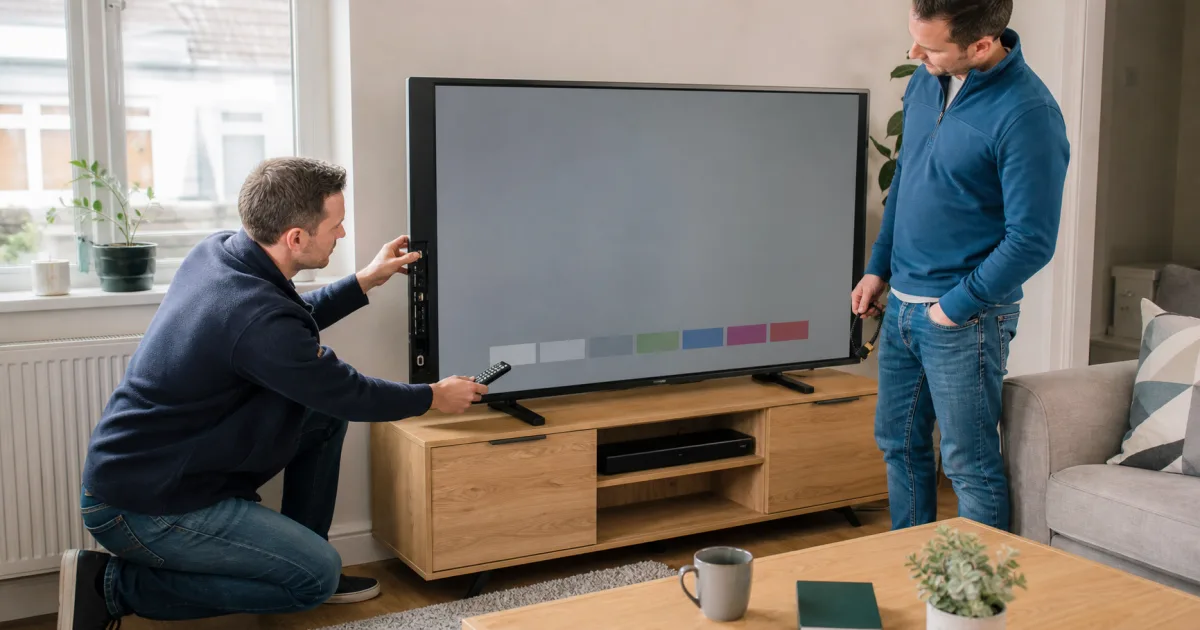
Display full-screen white, mid-grey, black, red, green and blue from a trusted local source or the TV’s built-in diagnostic. Stand at a normal viewing distance, then inspect more closely. Solid colours can reveal dead or stuck pixels, coloured lines, dirty-looking patches, banding, bright pressure points and image retention that busy video conceals.
What each test can reveal
- White and grey: tinting, brightness variation, dirty-screen effect and vertical bands.
- Black in a dimmer room: backlight bleed, bright zones and uneven blacks.
- Red, green and blue: stuck pixels, colour-channel defects and persistent shapes.
- Slow camera pans or sport: motion issues and panel-uniformity distraction.
- Faces and natural scenes: unusual colour, contouring and processing artefacts.
- Subtitles and sharp menus: focus, scaling and local brightening behaviour.
- A dark-to-bright sequence: unstable brightness, flicker and temporary retention.
Some uniformity variation is inherent to display technology and may be visible only in artificial tests. Judge whether it is distracting in the content you actually watch. Photographing a screen can introduce camera banding or moiré that is not visible to the eye, so inspect directly rather than deciding from a seller’s phone image.
Look specifically for persistent image retention
On OLED and older plasma displays, examine full-screen greys and several colours for faint channel logos, scoreboards, menu bars or game interfaces. LG’s official guidance distinguishes temporary image retention from longer-lasting burn-in and notes that static images can cause it. A panel-care or pixel-cleaning feature may reduce temporary retention but does not guarantee removal of permanent wear.
Do not repeatedly run intensive panel-maintenance cycles during a viewing or accept a promise that a persistent mark will certainly disappear. Follow the exact model’s manufacturer instructions and price any visible mark as part of the panel’s present condition. Panel replacement can cost enough to make the purchase uneconomical.
Separate source faults from TV faults
Run the television’s built-in picture test where available. Manufacturers use self-diagnostics to distinguish a problem in the display from a set-top box, cable or broadcast source. Then test a known-good HDMI source and cable. If an artefact appears only on one broadcast or one device, change the source and cable before blaming the panel.
Test every HDMI port and required feature
Connect a trusted laptop, console or media player to each HDMI port. Confirm stable picture and sound, then select the resolutions and frame rates you need. Test HDR, enhanced HDMI mode, variable refresh rate or high refresh only when both source and exact port support them. A port labelled for ARC or eARC should be tested with compatible audio equipment if that feature matters.
Do not assume every HDMI socket has the same bandwidth or feature set. Check the manual and on-screen input information. Inspect sockets for bent contacts or looseness without aggressively moving the cable. Dropouts, coloured sparkles or loss of handshake may come from the cable, source, configuration or port, so change one factor at a time.
Check USB, aerial, network and audio
- Open a harmless photo or short video from your own clean USB drive.
- Connect an aerial where available and tune or view expected terrestrial channels.
- Test Ethernet and Wi-Fi with a trusted network, then forget your connection.
- Pair and remove a non-sensitive Bluetooth audio device if supported.
- Check optical, analogue headphone and other audio outputs you require.
- Test each built-in speaker at low and moderate volume for buzz or distortion.
- Confirm the remote, physical buttons, voice mute switch and accessibility controls.
If Irish free-to-air terrestrial television matters, check the exact model in Saorview’s approved-product database and test it with a suitable aerial signal. Saorview states that approved TVs have undergone testing for the service. A poor aerial feed can cause breakup even when the tuner is healthy, so compare signal evidence carefully.
Test smart features without sharing your account
Open the app store or current built-in applications without entering your permanent credentials. Check the operating-system version, latest available update and whether the exact services you need still support the model. Old apps may open to a logo but fail at sign-in or playback. A streaming stick can extend usefulness, but add its cost and occupy a port and power connection.
Ask the seller to sign out of all streaming, manufacturer, voice-assistant and home-automation accounts and remove paired cameras or microphones. After testing, they should use the manufacturer’s supported factory reset. Begin setup only far enough to confirm that no previous-owner PIN, hotel mode, organisation profile or account restriction remains.
Check repair history and parts availability
Ask what was repaired, which parts were used and whether an invoice or remaining repair warranty exists. A replaced main board, panel or power supply can be serviceable, but it changes the evidence you need. Search the exact model for current manufacturer support, firmware, remote controls, feet and boards. Do not assume a universal remote can access every setup or accessibility function.
Know whether the seller is private or a business
The CCPC explains that second-hand goods bought from an Irish business carry consumer-law protections while accounting for faults and wear disclosed before purchase. A private consumer-to-consumer sale is generally buyer beware. A commercial seller cannot pretend to be a private individual, so clarify status when an account regularly lists repaired or graded televisions.
For a business sale, record the legal seller, exact model, grade, disclosed faults, tests, total price, delivery, installation, warranty and returns. A commercial warranty does not replace statutory rights. With a private seller, testing, written answers and a receipt are especially important because the same consumer remedies do not apply.
Plan collection before paying
Measure doors, stairs, lifts and vehicle load space. Use the original fitted packaging where available or a purpose-made television carton with corner and screen protection. Keep the television upright in the orientation specified by its manufacturer, secure it against movement and never lift it by the panel, ports or stand neck. Large sets require enough capable people and a clear route.
Do not place pressure against the screen or transport a large panel flat merely because it fits that way. Remove feet only as the manual directs, retain every screw and protect the remote and cables separately. If safe transport costs more than expected, include delivery or a professional carrier in the price comparison before committing.
Calculate the complete cost
Compare the exact model, age, panel condition, stand, remote and seller status in EUR. Add a suitable mount or cabinet, replacement remote, streaming device, cables, transport and likely repair. Estimate energy cost from official model information. A newer €350 TV with supported apps and lower consumption may cost less over several years than a €180 set needing accessories and an uncertain panel repair.
Reasons to walk away
- Model or serial identity conflicts with the advert or has been removed.
- Cracked plug, damaged cable, burning smell, liquid damage or unsafe modification appears.
- Persistent lines, burn-in, large bright spots or panel separation is undisclosed.
- Cold-start or warm-running faults cause restarts, flicker or picture loss.
- Required ports, tuner, sound or smart services cannot be demonstrated.
- The seller blocks a factory reset or cannot remove a PIN or managed mode.
- Transport cannot be completed upright and protected as the manufacturer requires.
- A deposit, courier fee or payment link is pushed before inspection.
Final second-hand TV checklist
- Exact model, dimensions, stand footprint and required features suit the room.
- Seller history, identity, safety notices and repair evidence are credible.
- Screen, cabinet, stand, plug, cable, ports and vents show no unsafe damage.
- Cold start and at least twenty minutes of operation are stable.
- Solid colours and real content reveal no unacceptable pixel, uniformity or retention issue.
- Every required HDMI, USB, audio, network and tuner function is tested.
- Software, apps, Saorview needs and remaining support are understood.
- Accounts and restrictions are removed and the official reset completes.
- Energy, accessories, mounting, transport and repair are included in the total cost.
The right used television is the one whose exact model fits your room and whose panel, inputs, sound, software and electrical condition survive a controlled test. Bright demonstration footage and an attractive asking price cannot replace solid-colour checks, known-good sources, a cold start and a safe transport plan. Complete those checks before payment and the real value becomes much easier to see.
Tags
More from
New related stories are added frequently.